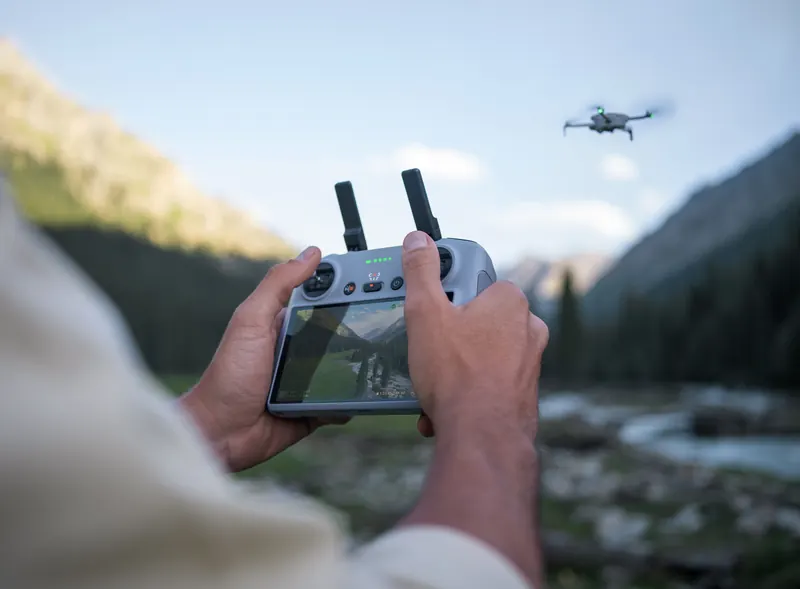
How to fly a drone: your first flight, step by step
Pass the FAA's test, register the drone if it needs it, check the spot, then fly the way your drone's own manual says, in an open area and always in sight.
- Register over, flying for fun
- 0.55lb
- Registration, good for 3 years
- $5
- Ceiling flying for fun, Class G
- 400ft
- Age to register a drone
- 13+
Do you need a license to fly a drone? TRUST or the remote pilot certificate
Before the first flight, the rules ask four things of you: the TRUST test or the Part 107 certificate, registration if your drone needs it, Remote ID, and a check of the spot.
It depends on why you fly. Flying only for fun, you must pass the FAA's free online safety test, TRUST, before you fly, and show a copy of the certificate if law enforcement asks: our TRUST certificate guide explains it. Any other flight falls under Part 107, where no one may act as remote pilot in command without a remote pilot certificate with a small UAS rating; without one, a person may work the controls only under the direct supervision of a certificated pilot who can take over at once. Our drone license guide covers the Part 107 test step by step.
If you're learning how to fly a drone, two kinds of document tell you how: the FAA's rules and guidance, and the user manual your drone's maker wrote for it. This page quotes both and adds nothing of its own. The flying steps come from three makers' manuals: DJI's for the Mini 4 Pro and the Neo, and Potensic's for the ATOM 2.
Register your drone with the FAA and check Remote ID
Register it unless it weighs 0.55 lb (249 g) or less and you fly only for fun; a drone that is registered, or has to be, must broadcast Remote ID.
Every drone must be registered with the FAA, except one of 0.55 lb (249 g) or less flown only for fun under the recreational exception. Registration costs $5 and lasts three years: per drone under Part 107, and one registration for all your drones when you fly for fun. You register online at FAA DroneZone; the owner must be 13 or older. Label every drone with its registration number before you fly it, and have the registration certificate with you when you're flying, on paper or in digital form. The registration helper gives the answer for your own drone, battery and use in three questions.
A drone that is registered, or has to be, must broadcast Remote ID: built in, with a broadcast module, or with neither only inside an FAA-recognized identification area (FRIA). Some drones broadcast only with their larger battery. In our drone records, 3 models broadcast Remote ID only with a named battery: Antigravity A1 (High-Capacity Flight Battery), DJI Mini 3 (Intelligent Flight Battery Plus) and DJI Mini 4 Pro (Intelligent Flight Battery Plus). Our Remote ID guide lists every model we cover.
Do I have to register?
Three questions: your drone, its battery and why you fly. The answer names the rule behind it.
Open the registration helperCheck the spot before you fly your drone
Near airports you need FAA authorization first; everywhere else, flying for fun, keep at or below 400 feet.
The FAA's B4UFLY service “shows where recreational flyers can and cannot fly”. Companies the FAA approved offer it as desktop and phone apps, with controlled and special use airspace, critical infrastructure, airports, national parks and Temporary Flight Restrictions, and a status that says whether it is safe to fly.
- Near airports: in controlled airspace (Class B, C, D and the surface area of Class E designated for an airport) a recreational flyer needs prior FAA authorization, through LAANC or DroneZone. Our airspace classes guide shows each class.
- Everywhere else: in uncontrolled Class G airspace, flying for fun, keep at or below 400 feet. Our guide to how high a drone can fly has the exceptions.
- Under Part 107: before each flight the remote pilot must assess the local weather, the local airspace and any flight restrictions, where people and property are on the surface, and other ground hazards (14 CFR 107.49(a)).
Can I fly here?
Our flight check takes a place and a drone and returns one verdict with its reasons: no-fly zones, airspace, the ceiling, wind and daylight.
Check your spot in Can I fly here?Drone controls: what the left stick and right stick do
In Mode 2, the default: the left stick climbs, descends and turns the drone; the right stick flies it forward, backward, left and right.
A drone flown with a remote controller has two sticks. DJI's Mini 4 Pro works in Mode 1, 2 or 3, and “The default control mode of the remote controller is Mode 2.” Potensic's ATOM 2 also starts in Mode 2, which Potensic calls left-hand throttle. In Mode 2:
-
Left stick
Push it up or down to climb or descend (the throttle); push it left or right to turn the drone counterclockwise or clockwise (yaw).
Up, down, turn -
Right stick
Push the right stick up to fly forward and down to fly backward (pitch); push the right stick to the left or right to fly the drone left or right (roll).
Forward, back, sideways
DJI: “The aircraft hovers in place if the stick is in the center.” The farther you push a stick, the faster the drone moves, and DJI says to push the throttle gently to avoid sudden changes in altitude. Potensic: “For beginners, it is recommended to face the rear of the drone” and keep it in sight, so you do not misjudge which way it is facing and moving.
The Neo can also be flown from a phone, with virtual sticks in the DJI Fly app: “The left stick controls the flight altitude and orientation”, and the right stick moves it forward, backward, left and right. The table is for each manual's default mode; your manual's stick table shows the other modes.
| Drone | Manual | How you control it | Default stick mode | Left stick | Right stick |
|---|---|---|---|---|---|
| DJI Mini 4 Pro | DJI Mini 4 Pro User Manual v1.4 (2024.06) | Remote controller, in stick Mode 1, 2 or 3 | Mode 2 | Up and down: climb and descend. Left and right: turn counterclockwise and clockwise. | Up and down: forward and backward. Left and right: fly left and right. |
| DJI Neo | DJI Neo User Manual v1.2 (2024.11) | Palm Control, or virtual sticks in the DJI Fly app | Not stated for the app | Altitude and orientation | Forward, backward, left and right |
| Potensic ATOM 2 | Potensic ATOM 2 User Manual V08.25.12 | Remote controller, in stick Mode 1, Mode 2 or Custom | Mode 2 (left-hand throttle) | Up, down, turn left, turn right | Forward, backward, left and right |
Pre-flight checklist from the makers and the FAA
The makers' pre-flight checklists differ in length: 10 items for DJI's Mini 4 Pro, 8 items for DJI's Neo and 11 items for Potensic's ATOM 2.
DJI's list for the Mini 4 Pro, in its own order:
- Protectors removed.
- Battery and propellers mounted securely.
- Remote controller, phone and flight battery charged.
- Arms unfolded.
- Gimbal and camera working.
- Nothing blocking the motors.
- DJI Fly connected to the drone.
- Camera lenses and sensors clean.
- Only genuine parts used.
- Obstacle Avoidance Action, max altitude, max distance and RTH altitude set “properly according to the local laws and regulations”.
Before the very first flight there is more. The Mini 4 Pro's battery “must be activated by charging”. The ATOM 2 must be activated in the Potensic Eve app before first use (an unactivated drone gets “up to 3” limited flights), and compass calibration “is required for first-time use”. Potensic's 11 items include checking the local weather, waiting for GNSS mode before takeoff, and setting in advance what the drone does when the signal is lost, its return altitude and its limits. For Palm Control, the Neo must already have connected to DJI Fly by Wi-Fi.
Under Part 107, before each flight the remote pilot must check that the drone is in a condition for safe operation (14 CFR 107.15). The FAA's guidance says the preflight inspection “should be conducted in accordance with the small UAS manufacturer's inspection procedures when available” (AC 107-2A), and its Appendix E is a sample checklist: 31 numbered preflight items, from weather, airspace and people to a briefing, power, the control links, the compass and a low test hover, then a post-flight section.
How to fly a drone for beginners: your first flight
Then fly the way your drone's own manual says, in an open area and always in sight. DJI's manual gives the Mini 4 Pro's first flight in this order:
-
Set it down
Rear toward youPlace the drone in an open, flat area “with the rear of the aircraft facing towards the user”.
-
Power on
Power on the remote controller and the drone.
-
Open the app
Open DJI Fly.
-
Set the limits
Set the obstacle avoidance action, the max altitude and the RTH altitude.
-
Self-check
Wait for the drone's self-check to finish.
-
Take off
Throttle up slowlyStart the motors with the Combination Stick Command, release both sticks, then “Push the throttle stick up slowly to take off”.
-
Land
Level surfaceTo land, hover over a level surface and push the throttle stick down.
-
Motors off
After landing, hold the throttle down until the motors stop.
-
Power off
Drone firstPower off the drone before the remote controller.
After takeoff, wait for the voice prompt “Home Point is updated” before you fly on. If you use Auto Takeoff instead, the drone rises to about 3.9 ft (1.2 m) and hovers. The other two manuals differ in the details, side by side in the table below. On first use the ATOM 2 starts in Beginner Mode: distance and altitude limited to 98 ft (30 m), Video Mode only, at a flight speed of 13.4 mph (6 m/s).
This page puts three makers' manuals and the FAA's guidance side by side, with no tips of our own.
Never stop the motors in the air
“Stopping the motors mid-flight will cause the aircraft to crash”, and DJI Fly's Emergency Propeller Stop is set to Emergency Only by default.
The first flight in all three manuals
| Drone | Manual | Pre-flight checklist | Takeoff | Auto takeoff hovers at | Palm launch | Landing | Return to home, by you | Return to home, by itself | Post-flight checklist | Wind limit | Daytime only |
|---|---|---|---|---|---|---|---|---|---|---|---|
| DJI Mini 4 Pro | DJI Mini 4 Pro User Manual v1.4 (2024.06), pages 19, 23-26, 50, 79-80, 118-119 | 10 items | On open, flat ground with its rear facing you, start the motors with the Combination Stick Command, then push the throttle stick up slowly. | About 3.9 ft (1.2 m) | No: “DO NOT launch the aircraft from your palm or while holding it with your hand.” | Hover over a level surface, push the throttle stick down, and hold it down until the motors stop. | Press and hold the Flight Pause/RTH button until it beeps; press it again to cancel. | On low battery, or when the control signal is lost. | 3 checks | Up to 23.9 mph (10.7 m/s) | No daytime-only limit in the manual |
| DJI Neo | DJI Neo User Manual v1.2 (2024.11), pages 12-14, 16-17, 23, 27 | 8 items | In the app's Manual Control, on flat ground: tap and hold. Or take off from your palm in Palm Control. | About 2.0 ft (0.6 m) | Yes, in Palm Control | In the app: tap and hold to land. Or land it on your palm. | Not supported in Palm Control or Mobile App Control. | Not stated for these two ways of flying. | None printed | Up to 17.9 mph (8 m/s) | Yes: daytime flights only |
| Potensic ATOM 2 | Potensic ATOM 2 User Manual V08.25.12, pages 9-10, 20, 22-23, 36-41, 56 | 11 items | Start the motors with a combination stick command, push the throttle up gently and release it once the drone is in the air: it hovers. | About 3.9 ft (1.2 m) | No: “Handheld or palm takeoff and landing are not supported.” | Pull the throttle down until the drone lands; release it when the motors stop. | Hold the RTH button for 1 second, or swipe in the app. It needs a takeoff in GNSS mode with the home point recorded. | On low battery, when the signal is lost, or in other abnormal situations. | 3 checks | No figure in the manual; it says not to fly in strong wind. | Yes: daytime flights only |
Where to fly a drone for the first time
In an open area, away from buildings, and not in snow, rain or fog.
All three makers ask for an open area. DJI says to take off no closer than about 33 ft (10 m) to buildings with the Mini 4 Pro and 49 ft (15 m) with the Neo, and not to fly in snow, rain or fog. Potensic says not to fly the ATOM 2 in strong wind, rain, snow, hail or dense fog. The wind limits are in the table above; our drone weather forecast checks the wind against your own drone's rating, hour by hour.
The Neo “does not feature obstacle sensing”, and its manual adds: “Only fly DJI Neo in the daytime.”
Return to home: what it does and what it does not
Return to Home (RTH) “brings the aircraft back to the last recorded Home Point”.
-
DJI Mini 4 Pro
On the Mini 4 Pro it starts when you trigger it, on low battery, or when the control signal is lost. Press the Flight Pause/RTH button once and the drone brakes and hovers; press and hold it until it beeps to start RTH; press it again to cancel.
Yes -
Potensic ATOM 2
On the ATOM 2, hold the RTH button for 1 second, or swipe in the app; RTH needs a takeoff in GNSS mode with the home point recorded.
GNSS takeoff -
DJI Neo
The Neo's manual says “Return to Home (RTH) is not supported” in Palm Control or in Mobile App Control.
Not supported
The FAA's warning
The FAA warns that return to home “could initiate a straight-line path toward the person operating it”, a path that could cross people or hit a tree or power lines.
Keep the drone in sight
All three manuals say to fly within visual line of sight, and for anyone flying for fun it is also the law.
All three manuals say to fly within visual line of sight. Flying for fun, that is also the law: you, or a visual observer co-located with you (the FAA says “co-located (physically next to)”) and in direct communication with you, keep the drone in sight. Visual line of sight means seeing the drone and the airspace around it with your own eyes, corrective lenses allowed, throughout the flight. You must also not interfere with, and must give way to, any manned aircraft.
Part 107 has its own sight rule (14 CFR 107.31): the remote pilot, the person at the controls and any visual observer must be able to see the drone throughout the flight with unaided vision, and the watching itself is done by the pilot and the person at the controls, or by a visual observer. Flying with goggles? Our guide to what FPV is quotes each rule on goggles.
Flying at night
The FAA puts it in one line: “If you want to fly at night, your drone must be equipped with required lights.”
Flying for fun at night, you follow a community-based organization's safety guidelines that have night procedures detailing the lighting required. Under Part 107, the drone needs lighted anti-collision lighting “visible for at least 3 statute miles”, and the remote pilot must have passed the initial knowledge test or training after April 6, 2021 (14 CFR 107.29). Two of the three manuals limit flying to daytime anyway: the Neo's and the ATOM 2's. Both rulebooks side by side, civil twilight and what makers' manuals say about lights are in our guide to flying drones at night.
3 statute miles
How far a Part 107 drone's anti-collision lighting must be visible at night (14 CFR 107.29).
Flying drones at nightAfter the flight
Inspect the drone and its parts, keep the lens and sensors clean, and store it before you carry it.
DJI's post-flight checklist for the Mini 4 Pro has three checks: inspect the drone, the remote controller, the gimbal camera, the batteries and the propellers; keep the lens and sensors clean; store the drone correctly before you transport it. Potensic prints the same three checks for the ATOM 2. The Neo's manual prints none.
Before, during and after: FAA guidance and Part 107 side by side
For recreational flyers, the FAA recommends what community-based organizations' safety guidelines should cover; these are recommendations, not rules. For Part 107 pilots, the preflight steps are rules.
Each in its own cell:
| Stage | Flying for fun | Part 107 |
|---|---|---|
| Before you fly | The FAA recommends a preflight safety assessment, and points to the sample checklist in AC 107-2A, Appendix E, as an example to adapt.AC 91-57D, para 3.3.2.1.1, item 5 | Rule: assess the weather, the airspace and flight restrictions, people and property on the surface and other ground hazards; brief everyone involved; make sure the control links work, there is enough power, and anything attached is secure. Check the drone is in a condition for safe operation.14 CFR 107.49(a)-(e); 107.15 |
| In flight | The FAA recommends watching the drone's performance, the strength of the control link, changing weather, and people or aircraft entering the area, and knowing how its automated features behave.AC 91-57D, para 3.3.2.1.1, item 6 | Rule: the remote pilot, the person at the controls and any visual observer must be able to see the drone throughout the flight.14 CFR 107.31 |
| After the flight | The FAA recommends reviewing the flight for unplanned events that presented a risk, and securing the drone between flights with the batteries removed, as its maker advises.AC 91-57D, para 3.3.2.1.1, item 7 | The FAA's sample checklist ends with two post-flight items: decide whether repairs are needed before the next flight, and review the flight for malfunctions, risks met and what to improve.AC 107-2A, Appendix E |
Related pages
The rules, the tools and the guides this page draws on.
Questions about flying a drone
How do you fly a drone with a remote control?
In Mode 2, the default on the Mini 4 Pro's and the ATOM 2's controllers: the left stick climbs, descends and turns the drone; the right stick flies it forward, backward, left and right. With both sticks in the center, the drone hovers in place.
How do you fly a drone with your phone?
Some drones, yes. DJI's Neo can be flown from the DJI Fly app with virtual sticks, the left one for altitude and orientation, the right one for forward, backward, left and right. Return to Home is not supported that way.
Is there a PDF on how to fly a drone for beginners?
Your drone's user manual: the makers publish them as PDF files, and the three quoted here are PDFs from DJI and Potensic. The FAA's AC 107-2A, also a PDF, has a sample preflight checklist in Appendix E.
Can you fly a drone with goggles?
DJI's manuals say using the goggles does not satisfy visual line of sight. What each rulebook asks when you fly with goggles is quoted in our guide to what FPV is.
Can you fly more than one drone at a time?
Not without FAA permission: “A drone pilot needs a waiver to fly more than one drone at the same time.”
Where can you land a drone?
The FAA says anywhere the landing area is safe and not prohibited by local, state or federal laws.
Can my neighbor fly a drone over my property?
The FAA has set no minimum altitude for drones; state laws differ. Our guide to flying over private property covers each state.
How much does a drone pilot make?
There is no official U.S. wage figure for “drone pilot” as such. Our drone pilot salary page shows the nearest official figures and what each includes.
Sources Named, not linked. Read November 14, 2026.
Documents are named, not linked. The manuals and the FAA's pages were read on November 14, 2026, and the FAA pages' dates, the rule texts and the advisory circulars' status were read again on November 14, 2026.
Makers' manuals
- DJI Mini 4 Pro User Manual v1.4 (2024.06), DJI: pages 19, 23-26, 50, 79-80, 118-119
- DJI Neo User Manual v1.2 (2024.11), DJI: pages 12-14, 16-17, 23, 27
- Potensic ATOM 2 User Manual V08.25.12, Potensic: pages 9-10, 20, 22-23, 36-41, 56
Law and regulations
- 49 U.S.C. 44809, Exception for limited recreational operations of unmanned aircraft: (a)(3) to (a)(7) (U.S. Code, 2024 edition)
- 14 CFR 48.15, registration: who must register (eCFR)
- 14 CFR 89.105, Remote ID: the ways to comply (eCFR)
- 14 CFR 107.12, 107.15, 107.29, 107.31 and 107.49 (eCFR)
FAA pages and guidance
- FAA, The Recreational UAS Safety Test (TRUST), last updated August 21, 2026
- FAA, How to Register Your Drone, last updated March 18, 2024
- FAA, Recreational Flyers & Community-Based Organizations, last updated October 29, 2026
- FAA, B4UFLY, last updated August 25, 2026
- FAA, Getting Started, last updated December 19, 2024: flying at night
- FAA newsroom, What To Know About Drones, January 14, 2025
- FAA Advisory Circular 91-57D, Exception for Limited Recreational Operations of Unmanned Aircraft, June 24, 2025
- FAA Advisory Circular 107-2A, Small Unmanned Aircraft System (Small UAS), February 1, 2021: 7.3 and Appendix E
Other documents
- FAA and DOT fact sheet, State and Local Regulation of Unmanned Aircraft Systems, July 14, 2023: no minimum altitude for drones
- Our drone records: Remote ID, battery and wind rating for each model, from each maker's own pages
Photos: DJI press images.